





How to Use Luggage Scale and Avoid Overweight Bag Fees

To use a luggage scale, attach it to a fixed suitcase handle, lift the fully packed bag clear of the floor, wait for the reading to lock, and repeat the measurement. This quick check helps travelers who check bags or fly on weight-restricted cabin fares find a problem before reaching the airport.
Start with the rule for your exact flight. Baggage limits can change with the airline, route, fare, cabin, and loyalty status. The airport scale controls the final decision, so a home reading should leave room below the published limit.
How to Use Luggage Scale Correctly
Correct use depends on preparing the complete bag, zeroing the scale, attaching it securely, and keeping the luggage still during measurement. Check the maximum capacity in the product manual. Stop weighing if the display shows an overload warning.
Step 1: Turn On and Zero the Scale
Switch on the unloaded scale and wait until the display shows 0.0. Select pounds or kilograms to match the unit used by your airline.
Step 2: Attach the Scale to a Fixed Handle
Pass the strap around the fixed top or side handle and close the buckle securely. Keep the strap flat so the suitcase hangs directly below the scale.
Do not attach the scale to the telescoping pull handle. Use a fixed carry handle that can support the suitcase during lifting.
Step 3: Lift the Luggage Clear of the Floor
Stand on a firm surface and lift the scale slowly with both hands when possible. Raise the suitcase until every wheel is clear of the floor. Keep the bag still without letting it touch your body, a wall, or nearby furniture. Any outside support can produce a lower reading.
Step 4: Wait for the Reading to Lock
Hold the suitcase steady until the display stops changing. A digital scale may beep or show a hold symbol when the final weight is saved. Lower the suitcase before reading the locked result.
Reset the scale and weigh the bag again. If the readings differ, repeat the process and use the highest stable result.
|
Check |
Correct result |
Action when it fails |
|
Empty display |
0.0 lb or 0.0 kg |
Reset or tare the scale |
|
Attachment |
Strap or hook stays secure |
Reattach to the fixed handle |
|
Bag position |
Every wheel clears the floor |
Lift slightly higher |
|
Motion |
Bag hangs still |
Lower it and repeat slowly |
|
Repeat test |
Readings closely agree |
Check the battery and technique |
Why Luggage Scale Readings Can Be Wrong
Changing numbers usually come from movement, partial support, or a setup error. Find the cause before removing items from the suitcase.
Stop the Luggage From Touching or Swinging
A wheel left on the floor transfers part of the load away from the scale and produces a low result. Contact with furniture can do the same.
Swinging adds a changing force to the sensor. Lift in one smooth motion and pause. Read the screen after lowering it.
Check the Unit and Battery
Pounds and kilograms are easy to confuse when the unit mark is small. A reading of 22.0 kg equals about 48.5 lb. Confirm the screen unit against the airline page.
A low battery can cause a dim screen or unstable operation. Replace or recharge it according to the product manual, then reset the scale.
Test Repeatability Without Claiming Calibration
A scale may need calibration when the same bag produces noticeably different readings or the display does not return to 0.0 after the load is removed.
Check the product manual before calibration because the process varies by model. Place the unloaded scale on a stable surface, turn it on, and enter its calibration mode. The manual may instruct you to hold a specific button until “CAL” appears.
Use the exact calibration weight stated in the manual. Add that weight only when prompted, wait for the confirmation message, and then remove it. Restart the scale and test the same weight again.

Which Luggage Weight Limits and Fees Apply
There is no single U.S. baggage limit. Weight allowances can change with the airline, route, fare, and cabin. Check the complete airline restrictions for luggage size and weight that apply to your flight.
These charges cover excess weight. Standard checked bag and size charges may also apply.
|
Airline example |
Standard checked weight |
First overweight tier |
Published extra fee |
|---|---|---|---|
|
American Airlines within the U.S. and Canada |
Up to 50 lb |
Over 50 through 53 lb |
$30 |
|
Delta within the U.S. |
Up to 50 lb |
51 through 70 lb |
$100 |
|
Frontier |
Up to 40 lb |
41 through 50 lb |
$75 |
|
JetBlue |
Up to 50 lb |
51 through 99 lb |
$150 |
Check Carry On Luggage Weight Separately
Some U.S. carriers focus on cabin bag dimensions, while other airlines publish a strict carry on weight. Your baggage carry plan should follow the strictest operating carrier on the itinerary. Weigh the cabin bag with anything that will stay inside at boarding.
Leave a Practical Luggage Weight Buffer
Packing exactly to the limit leaves no room for a difference between devices or a late packing change. A target below the limit provides a practical margin.
Choose the margin from your own repeat readings. If two measurements differ by 0.4 pounds, a one-pound buffer is more useful than targeting 49.9 pounds on a 50-pound allowance. A larger difference means the setup or scale needs attention.
How to Avoid Overweight Luggage Fees After Weighing
Act on the number before leaving home or the hotel. The lowest-cost choice depends on the amount over the limit and the fee rules for your fare. When comparing new luggage, check empty weight together with capacity and outside dimensions.
Remove Weight Before Buying Another Bag
Remove items that are easy to replace or leave behind, then reweigh the bag. Moving weight to a personal item only works when that bag remains within its own limits. Check security rules before changing where an item travels.
Use a Lighter Carry On for a Strict Limit
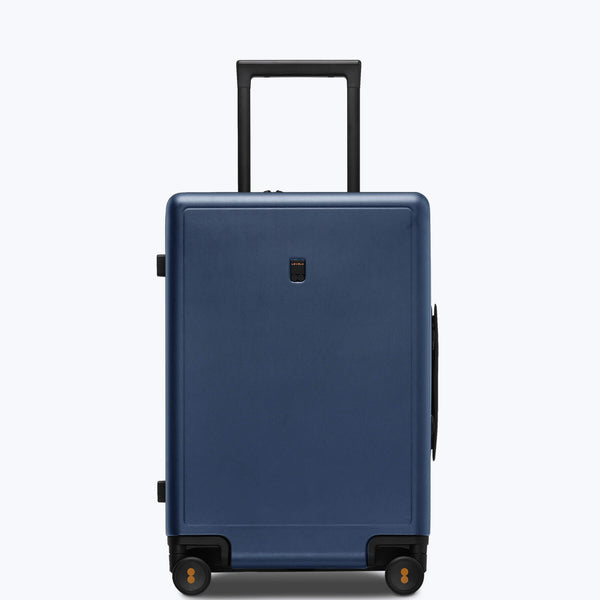
A heavy empty case uses part of a cabin weight allowance before packing begins. The Luminous Textured Carry-On 20 addresses that problem with a listed empty weight of 7.7 pounds and 40 liters of capacity.
Its German-made Makrolon polycarbonate shell keeps the case relatively light while providing a hard exterior for packed belongings.
Compare a Second Bag With the Overweight Fee
Moving weight into another suitcase helps only when the second piece is allowed and costs less. Travelers who often need two sizes can review luggage sets, then weigh each packed piece separately. Two bags under a combined total can still fail when the airline applies a limit to each bag.
FAQs
Can You Bring a Digital Luggage Scale on a Plane
Yes, in most cases. The FAA battery guidance allows common battery-powered devices in carry-on baggage. Checked devices must be fully off and protected, while spare lithium batteries stay in the cabin.
Does Tare Remove the Suitcase Weight
No. Tare resets the unloaded scale or subtracts an attached container. Airlines weigh the packed suitcase and its contents together, so the final reading must include the case.
Should You Lock the Reading Before Lowering Luggage
Yes, when the scale supports hold mode. Wait for the beep or stable symbol, lower the bag, and read the saved value. An analog model must be read while the load is suspended.
Can an Airline Charge Both Overweight and Oversize Fees
Yes, some airlines can. Delta states that separate charges may apply for size, weight, and quantity. American Airlines applies the higher applicable fee when one item exceeds both limits.
Can Two Travelers Combine Their Luggage Allowance
Sometimes. Pooling rules depend on the airline and booking. Do not assume that one heavy bag can use another traveler's unused allowance.
Use the Luggage Scale Before Every Flight
The reliable routine is simple. Check the exact allowance, finish packing, zero the scale, lift from a fixed handle, and repeat the reading. Leave a buffer based on the consistency of your own measurements.
If the bag is heavy, compare removing items with the real cost of another checked piece. Recheck after packing changes and before the return flight. The airline's current page and airport scale make the final decision.

Leave a comment